
|
Getting your Trinity Audio player ready...
|
Table of Contents
hide
Like & Follow us on Social Media
Enjoy 5%
OFF
Coupon
Code: HAPPY5
Quality Finish Guaranteed
Free Shipping on Orders Over $100
Screen Printing and Embroidery Available
Discount for You
Enjoy 5%
OFF
Coupon
Code: HAPPY5
Quality Finish Guaranteed
Free Shipping on Orders Over $100
Screen Printing and Embroidery Available

|
Getting your Trinity Audio player ready...
|
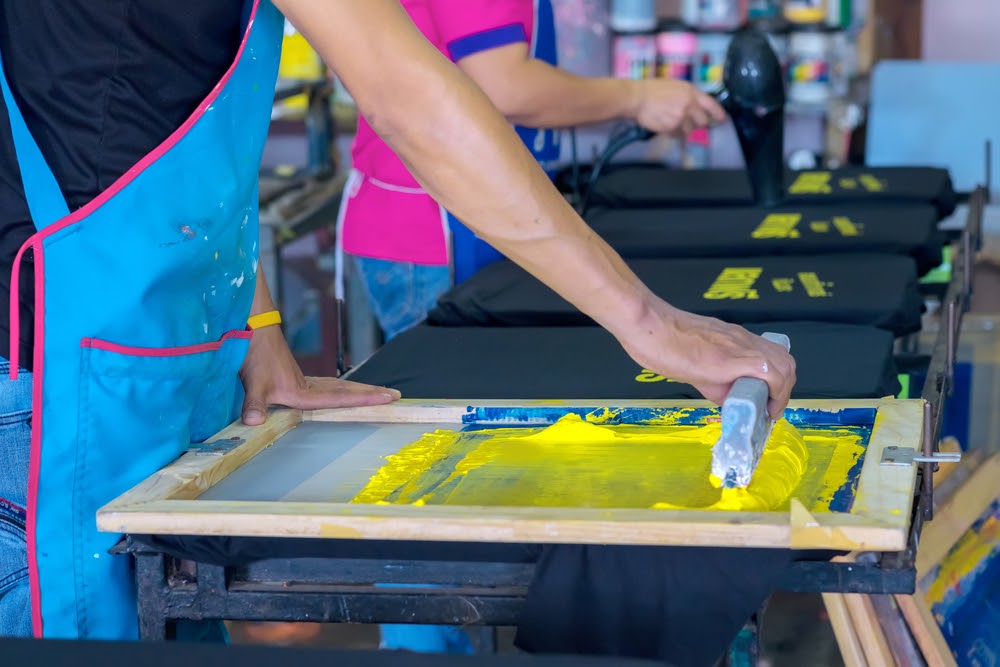
Screen printing is a versatile printing technique where ink is applied to fabric through a mesh screen, allowing for detailed and vibrant designs. It is ideal for bulk orders due to its cost-effectiveness and durability. Often used for t-shirts, hoodies, and other apparel, screen printing offers long-lasting results.
Screen printing involves several key steps to achieve high-quality, durable prints. First, the screen is coated with light-sensitive emulsion, which is exposed to light with a design film, creating a stencil. The mesh count is chosen based on the level of detail in the design, with higher counts for intricate details and lower counts for bolder designs. Accurate registration ensures multi-colour designs align properly, while the right printing pressure ensures even ink transfer. After printing, curing with heat is crucial to set the ink and ensure longevity, while flash curing between colour layers prevents smearing. Maintaining the correct ink consistency ensures smooth application, ultimately resulting in clear, professional prints.
Key Features & Guide of Screen Printing
Key factors in screen printing include choosing the right ink type, fabric, and equipment maintenance for high-quality prints. Plastisol ink is popular for its vibrant colours and durability, while water-based inks offer an eco-friendly option with a softer finish, and discharge ink provides a vintage look by removing the fabric’s dye. The choice of fabric, such as cotton or polyester, affects ink adherence and design durability, so it’s crucial to test compatibility. Simplifying intricate designs helps avoid printing issues with fine details or small text. Managing print speeds balances quality and efficiency, and environmental factors like temperature and humidity influence ink behaviour and curing. Regular equipment maintenance, including screen cleaning, ensures optimal print quality and longevity of tools.
The first step in screen printing involves preparing the screen. This begins with coating the screen with light-sensitive emulsion. A uniform and thorough coating is critical to achieving crisp, clear designs. The screen is then allowed to dry in a dark environment before it’s exposed to light with the design on a transparent film, which hardens the emulsion, leaving a stencil of the design.
Screen exposure is the process of transferring the design onto the screen. The screen is placed under a light source with the film of the design on top. The light hardens the emulsion, leaving the design area unexposed and ready to be printed. Proper exposure time and technique are vital for creating sharp, detailed stencils that will produce clean prints.
Mesh count plays a significant role in the clarity and quality of the print. The higher the mesh count, the finer the detail you can achieve in your design. A lower mesh count is best for bold designs, while higher mesh counts are ideal for fine lines and intricate details. Selecting the right mesh count ensures that the ink flows smoothly and that your design appears as intended.
For multi-colour designs, screen registration is crucial. Each colour must be printed using a separate screen, and it’s essential to align these screens accurately to ensure the design’s colours line up properly. Misalignment can result in blurry or off-centre designs. Using a registration system or jigs can help achieve precise alignment for clean, professional prints.
The amount of pressure applied when printing is crucial for achieving consistent results. Too little pressure can result in uneven prints, while too much pressure can cause the ink to bleed or the design to appear distorted. Proper pressure ensures that the ink is transferred evenly onto the fabric, creating sharp, defined prints.
Once the ink is applied to the fabric, it must be cured to ensure long-lasting durability. Curing involves applying heat to the printed fabric to dry and set the ink. If the ink is not fully cured, it can fade or crack after washing. A proper curing process is essential for creating prints that will withstand repeated wear and laundering.
In multi-colour prints, flash curing is used between each layer of ink to partially cure the design and prevent colours from smearing or mixing. This process involves briefly applying heat to “flash” cure the ink before applying the next colour layer. Flash curing ensures the colours stay vibrant and sharp without bleeding into one another.
Maintaining the correct ink viscosity is key to achieving smooth, even prints. Ink that is too thick can be difficult to work with, while ink that is too thin may not provide enough coverage. Adjusting the viscosity of your ink to the right consistency ensures smooth application and consistent print quality.
High-quality images are crucial for producing clear, sharp prints in screen printing. The resolution of an image directly impacts its detail and clarity in the final product. For screen printing, the image resolution should be at least 300 dpi (dots per inch). A higher resolution ensures that the design remains crisp and well-defined, even when scaled up or down. If the resolution is too low, the print may appear pixelated or blurry, diminishing the overall quality of the design.
In addition to resolution, the file format is equally important. Vector-based formats like .AI (Adobe Illustrator) or .EPS (Encapsulated PostScript) are ideal for screen printing because they use mathematical paths to define shapes, making the design scalable without any loss of quality. Unlike raster-based images (such as .JPG or .PNG), which can become pixelated when resized, vector files maintain crispness and sharpness at any size, ensuring the design remains clear and precise during the printing process.
For optimal results, designers should provide vector files whenever possible, as these are the easiest to work with in the screen printing process. Vector files also allow for easy separation of colours, which is essential for multi-colour prints, and provide flexibility in adjusting the design as needed without sacrificing quality.
Here are the key factors of screen printing:
There are several types of inks used in screen printing, each with unique characteristics. Plastisol ink is the most commonly used, known for its vibrant colour and durability. Water-based inks are more eco-friendly and produce a softer finish, but are less durable than plastisol. Discharge ink removes the fabric’s dye, leaving a soft, vintage look. Understanding the right ink for your design and fabric type is essential for achieving the desired effect.
The choice of fabric or material significantly affects the printing process and the final result. Cotton, polyester, and blends each require different ink and curing processes. Choosing the right fabric ensures that the ink adheres properly and that the design remains vibrant and durable. Always test the fabric to ensure compatibility with your chosen ink type.
While intricate designs may look impressive, they can often be challenging to print, especially if the design contains very fine details or small text. Designs that are too detailed may not reproduce well on fabric, resulting in blurry or incomplete prints. Simplifying complex designs ensures better print quality and reduces the risk of printing issues.
Speed is an important factor in screen printing, especially for large orders. However, printing too quickly can compromise the quality of the design. Finding the right balance between speed and quality ensures that prints are made efficiently without sacrificing detail or precision.
Temperature and humidity are critical environmental factors that can significantly impact the quality and consistency of the screen printing process. High humidity levels can cause the ink to behave unpredictably, affecting its viscosity, drying time, and how it adheres to the fabric. In humid conditions, ink may become too runny or thick, leading to inconsistent prints and difficulty controlling the application. Additionally, excessive moisture can cause the screen emulsion to break down, leading to blurry or imprecise designs.
Extreme temperatures, whether too high or too low, can also create issues during the printing process. High temperatures can accelerate the curing process, causing the ink to dry too quickly and potentially result in poor adhesion or cracking. On the other hand, low temperatures can slow down curing, causing the ink to remain wet for longer than desired, which can lead to smudging or fading. Temperature imbalances can also interfere with the performance of the printing equipment and the curing process, making it more difficult to achieve consistent results.
Maintaining a stable, controlled environment, typically around 20°C to 25°C (68°F to 77°F) and with moderate humidity, helps ensure that the ink behaves as expected, adheres properly to the fabric, and cures correctly. By managing these environmental factors, printers can achieve better consistency, reduce errors, and produce higher-quality prints that will withstand washing and wear.
The squeegee is one of the most important tools in screen printing, as it directly impacts the quality and consistency of the print. The choice of squeegee affects how ink is applied to the fabric, influencing the final result. A squeegee that is too soft or too hard can result in uneven ink distribution, leading to poor print quality. The ideal squeegee ensures that ink is transferred evenly and smoothly across the screen, creating sharp and consistent designs.
Squeegees come in various hardness levels, measured in durometer, which refers to the material’s resistance to indentation. The durometer of a squeegee determines how much pressure it will apply to the screen and fabric during printing, which in turn affects the ink transfer.
Choosing the right durometer is crucial for achieving the desired print quality, whether it’s for fine details or bold graphics, and helps ensure consistent results throughout the printing process.
Choosing the right ink type and substrate (material) is crucial for producing durable, vibrant prints that will withstand wear and washing. The ink type must be compatible with the substrate to ensure optimal adhesion, colour vibrancy, and longevity of the print.
Choosing the right ink and substrate ensures the design adheres properly, looks vibrant, and lasts long. Testing compatibility between the ink and substrate is always recommended, especially when working with unconventional fabrics or materials, to ensure that the print is of the highest quality.
Specialty inks like metallics, glow-in-the-dark, or puff inks add unique effects to designs, offering creative possibilities that standard inks can’t.
Spot printing uses solid, specific colours for each design element, whereas process printing blends multiple colours to create a full spectrum of shades. Understanding when to use each method can help achieve more accurate designs.
Regular maintenance of your printing equipment, including screens, squeegees, and other tools, is crucial for achieving high-quality and consistent results in screen printing. Over time, ink residue, emulsion, and other debris can accumulate on these tools, affecting their performance. Cleaning screens and squeegees after each print job prevents ink build-up that can cause blurry or imprecise prints. If left unchecked, wear and tear on these tools can lead to inconsistencies, costly mistakes, and potential downtime.
By regularly inspecting and cleaning your equipment, you ensure that every print job is as sharp and accurate as possible. For instance, checking the squeegee for frayed edges and ensuring the screen is free from residue will help prevent uneven ink distribution or compromised designs. This level of care not only improves the overall quality of your prints but also prolongs the lifespan of your equipment, saving you money on replacements and repairs.
Additionally, maintaining your tools helps preserve the consistency of your printing process, ensuring that each design comes out looking just as good as the last. When equipment is well-maintained, there is less risk of errors, allowing for smoother operation, quicker turnaround times, and a higher standard of work overall. In short, regular maintenance is a small investment that yields significant benefits, ensuring that your prints are of the highest quality and that your equipment remains in peak condition for longer.
After each printing session, cleaning screens is vital to maintain their longevity and prevent ink build-up. Using a dedicated screen cleaner removes residual ink, emulsion, and debris, ensuring that the screens remain in top condition for the next print. Proper cleaning not only helps avoid design distortion but also ensures that each print job maintains its sharpness and quality, extending the life of your equipment.
Screen printing is a versatile technique that can be used on a wide range of products, especially fabric-based items. Screen printing can be applied to almost any flat surface, making it perfect for creating custom designs on various products. The key is selecting the right materials and inks for each item to ensure high-quality prints that are durable and vibrant.
Here are some of the most popular products that can be screen printed:
After screen printing, proper curing of the ink is essential to ensure the design’s longevity and durability. Curing involves applying heat to set the ink, allowing it to bond permanently with the fabric. This step is critical for plastisol inks, as improper curing can cause the print to fade or peel after washing. Following curing, the printed garment must be allowed to cool to avoid smudging or damage. A thorough quality control check should then be performed to inspect each print for consistency, sharpness, and any defects, ensuring that only flawless products are delivered.
Packaging and proper storage are crucial in protecting the prints from damage during handling and transportation. Printed garments should be packaged carefully to avoid pressure or abrasion that could distort the design. Providing clear care instructions for customers is also vital to ensure that the print lasts, recommending cold water washes and air drying to preserve the design. Proper storage in a cool, dry environment further ensures that prints remain intact and vibrant, leading to greater customer satisfaction and fewer issues down the line.
Providing clear care instructions to customers helps maintain the vibrancy and durability of the print, ensuring that designs don’t fade or crack after washing.
Proper packaging ensures that printed items are protected during shipping. This includes using the right wrapping materials and preventing prints from being damaged during transportation.
Even experienced printers encounter issues during the screen printing process. Knowing how to troubleshoot can save time and money.
Ink bleeding or smudging can occur due to improper curing, incorrect pressure, or the wrong ink viscosity. Ensuring the right curing time and adjusting printing pressure helps avoid these issues.
Low screen tension can cause blurry prints or distortion. Proper screen tension is vital for keeping the design sharp and consistent.
Protecting intellectual property is crucial when working with screen printing, especially when printing logos or custom designs. Ensure that all designs used in screen printing are either created in-house or appropriately licensed. Avoiding copyright infringement prevents potential legal issues for businesses.
Manual presses are ideal for smaller, custom jobs, while automatic presses are designed for high-volume printing. Deciding when to invest in automatic equipment can help businesses manage larger orders efficiently.
Olivia is a graduate of the Custom Garment Printing program at RMIT University in Melbourne. She is an industry expert with over 15 years of experience in custom apparel printing. Her expertise spans screen printing, heat transfers, and embroidery, making her a trusted professional in Australia's garment printing industry.
Error: No feed with the ID 1 found.
Please go to the Instagram Feed settings page to create a feed.